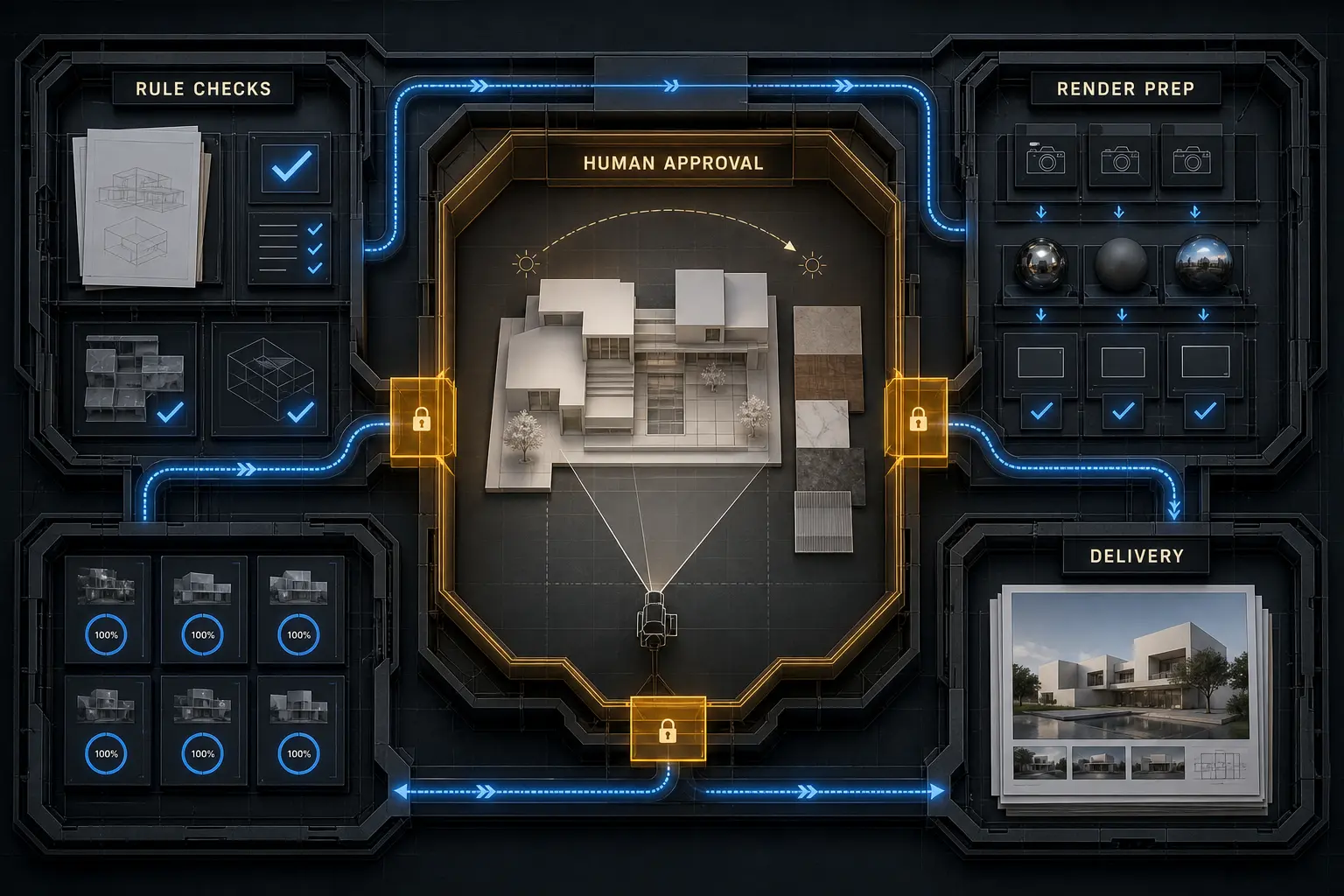
Architectural visualization automation is most valuable when it handles repeatable technical operations while people retain control over design interpretation, composition, lighting intent, material judgment, and final approval. Faster output alone is not a sufficient measure of success. A useful system must also produce traceable, consistent, reviewable results without weakening architectural accuracy or visual quality.
An archviz pipeline contains predictable operations, variable project conditions, and subjective visual decisions. Treating all three alike creates fragile workflows. A better approach is to map the production sequence, classify each step, automate where the rules are clear, and place approval gates around consequential decisions. This provides a practical foundation for improving scene intake, validation, rendering, review, revisions, and delivery.
Table of Contents
- What Architectural Visualization Automation Should—and Should Not—Do
- Map the Visualization Workflow Before Automating It
- The Best Operations to Automate in an Archviz Pipeline
- Keep Creative Judgment and Approvals Human
- Build a Reliable Render Pipeline, Not a Collection of Scripts
- Implement Automation in Controlled Stages
- FAQ
- What to Do Next?
What Architectural Visualization Automation Should—and Should Not—Do
Architectural visualization automation uses rules, scripts, integrations, templates, and coordinated processes to perform repeatable production operations. At the task level, it might rename outputs or check for missing references. At the workflow level, it can connect scene validation to preview generation and review. At the pipeline level, it can coordinate approved inputs, render jobs, status tracking, output organization, and delivery preparation.
The boundary matters. Deterministic automation follows known rules: a camera either has an approved name or it does not; an asset path either resolves or it does not; an output is configured at the required resolution or it is not. These checks are repeatable and verifiable. AI-assisted image making introduces interpretation and variability, so it needs different controls. A model-generated image cannot be assumed to preserve geometry, material relationships, façade details, or camera continuity simply because it looks convincing.
Production speed is different from production reliability. A script that submits a render quickly solves one operation. It does not necessarily prevent the wrong scene version from being rendered, stop files from being overwritten, identify missing passes, or record which camera was approved. Reliable archviz automation reduces repeated handling, coordination errors, and avoidable rework across revisions—not merely the time required to press a render button.
Consider a preflight process that checks scene naming, output paths, missing references, camera lists, and render settings. Those checks can follow explicit rules. Deciding whether a camera communicates the entrance sequence, whether the lighting establishes the intended hierarchy, or whether a material interpretation supports the architecture requires contextual visual judgment. Automate predictable execution, not unresolved design decisions.
Map the Visualization Workflow Before Automating It
Visualization workflow automation should begin with the full production flow, not an isolated inconvenience. Map the sequence from incoming geometry and references through scene preparation, look development, rendering, post-production, review, revision, and delivery. For every stage, identify its inputs, outputs, dependencies, repeated actions, decision points, exceptions, and approval owner.
Then classify each operation into one of three groups:
- Deterministic tasks have explicit rules and objectively testable results, such as checking file paths or creating an output folder structure.
- Judgment-dependent tasks require architectural, visual, or contextual interpretation, such as selecting a camera or resolving material character.
- Hybrid tasks can be prepared automatically but require human approval, such as producing standardized previews for composition review.
This classification prevents two common mistakes: automating subjective decisions as though they were technical checks, and leaving straightforward technical work buried inside manual production. It also exposes repeated transfers, duplicated setup, inconsistent naming, uncertain scene ownership, and informal approval states. These are not administrative side issues. They determine whether revisions reach the correct scene, whether an output can be traced, and whether the team knows what is ready to render.
A camera revision illustrates the point. The sequence might include receiving the request, locating the correct scene version, updating the camera, checking geometry visibility, assigning output settings, rendering a preview, reviewing the composition, approving the view, producing the final image, and registering the delivered version. Version lookup and output setup can be rule-based if the project structure is reliable. Framing, lens choice, visible design relationships, and approval remain human decisions.
Architectural production automation also crosses boundaries between modeling, visualization, rendering infrastructure, post-production, and review. If those boundaries are unclear, connecting them with scripts only moves uncertainty faster. Defined scene states, naming conventions, handoff requirements, and approval ownership give automation something stable to operate on.
The Best Operations to Automate in an Archviz Pipeline
A strong automation candidate is frequent, governed by clear rules, supplied with reasonably consistent inputs, and easy to verify. It should also have a manageable exception rate. Reversibility and observability matter: the operation should be safe to rerun where practical, and its outcome should be visible without opening every scene manually.
Useful candidates often include:
- Project folder creation, file naming, and version-format enforcement.
- Scene intake reports, reference checks, and asset-path validation.
- Camera enumeration and comparison against an approved camera list.
- Resolution, frame range, renderer, and output-path configuration.
- Render submission, pass organization, file conversion, and preview generation.
- Status notifications, review-set preparation, and delivery packaging.
Prioritize operations that reduce preventable errors and repeated handling. A small validation process that stops an invalid scene before an expensive render can be more valuable than an elaborate tool that saves a few clicks during an infrequent task. Frequency alone is not enough. Geometry cleanup, project-specific material assignment, and lighting preparation may occur often while still containing too many exceptions for dependable full automation.
These areas are usually better treated as hybrid 3D workflow automation. A system might identify duplicate materials, normalize metadata, flag suspicious texture scales, or prepare candidate mappings. A technical artist then reviews the result in context. The same principle applies to scene cleanup: known unwanted objects or empty layers can be handled by rules, but ambiguous geometry should not be deleted merely because it violates a naming pattern.
Local rendering automation and end-to-end render pipeline automation operate at different scopes. A local script might configure selected cameras. A pipeline coordinates approved camera data, scene versions, asset checks, submission, job state, output folders, and review status. The larger scope is justified only when those connections solve real production problems.
For example, a batch-render preparation process could read an approved camera list, confirm that every camera has a unique output name and valid resolution, check required assets, and create the expected output folders. If a texture is missing or two cameras would overwrite the same output, submission stops. Once validation passes, a person still approves the batch before final rendering begins.
Keep Creative Judgment and Approvals Human
Camera selection, composition, lighting intent, material interpretation, visual hierarchy, atmosphere, and storytelling are not incidental layers placed on top of technical production. They determine what the image communicates. These decisions depend on the design, project stage, audience, image set, and relationship between views. They cannot be reduced reliably to a universal checklist.
Visual plausibility must also be separated from architectural correctness. An image can appear polished while misrepresenting slab depth, circulation, façade rhythm, material scale, structural logic, or the relationship between interior and exterior space. AI-assisted modifications increase this risk because they can produce locally convincing details that conflict with the model or adjacent frames.
Architectural visualization automation should prepare evidence for judgment rather than conceal the need for it. Automated previews, contact sheets, comparison sets, and validation reports let reviewers inspect work in a consistent format. The system can identify missing frames, mismatched resolutions, absent passes, or unexpected version changes. It cannot determine whether a low viewpoint gives the building the wrong perceived scale or whether a bright foreground weakens the intended focal point.
Human approval gates should appear before consequential transitions: camera lock, high-resolution rendering, client-facing review, major AI-assisted alteration, and final delivery. Each gate needs explicit criteria. Depending on the stage, these can include design fidelity, composition, material intent, technical integrity, consistency across the image set, and readiness for the next production operation.
A practical review workflow might generate low-resolution previews for every approved camera and arrange them into a standardized set. Automated checks confirm frame presence, output dimensions, naming, and scene version. An art director then evaluates whether the views communicate the project, whether lighting supports the hierarchy, and whether the set feels coherent. Creative review is not an inefficiency to eliminate. It is a quality-control function that protects architectural meaning.
Build a Reliable Render Pipeline, Not a Collection of Scripts
A script performs an action. A pipeline coordinates inputs, dependencies, state, validation, execution, review, and outputs. Several useful scripts can still form a fragile production process if they infer status from filenames, rely on undocumented operator knowledge, or run without knowing whether a scene or camera has been approved.
Reliable render pipeline automation needs a clear source of truth for project, scene, camera, version, and output status. Structured inputs are preferable to instructions buried in messages or free-form filenames. The pipeline should know which scene version is eligible, which cameras are approved, what output settings apply, and where the resulting files belong.
Validation should occur before expensive operations. Relevant checks may include scene availability, external references, camera state, frame ranges, output paths, resolution, renderer configuration, and required resources. Validation is not complete merely because a scene opens. The scene must also correspond to the intended version and production state.
Unattended or distributed rendering adds queues, job status, timeouts, retries, and failure classification. Automatic retry is appropriate for a known transient problem, such as a temporary worker interruption. It is inappropriate for a missing texture, invalid output path, or unresolved approval. Repeatedly submitting the same invalid scene does not create resilience; it hides the fault and consumes resources.
Logs should answer what ran, against which input and version, what the process changed, and why it failed. Manual intervention paths must remain visible so an operator can correct an invalid dependency or override a blocked state through an accountable process. Where practical, operations should also be idempotent: restarting them should not duplicate jobs, overwrite approved files, or generate conflicting version records.
Suppose a submission pipeline validates dependencies, records the approved camera and scene identifiers, creates the render job, and monitors its state. It can retry a temporary worker failure within a defined limit. If a texture is missing, it blocks the job and routes the exception for correction. That distinction between recoverable infrastructure failure and invalid production input is central to dependable architectural production automation.
Complexity should remain proportional to need. A small team with a stable local process may be served by naming standards, a preflight script, and an explicit checklist. A multi-stage workflow spanning people, machines, and approval states needs stronger coordination. In both cases, documentation, dependency changes, and maintenance are part of the pipeline—not work that happens after it is built.
Implement Automation in Controlled Stages
Begin with one bounded production problem whose owner, trigger, inputs, outputs, and rules are clear. Record how the current process behaves: where manual touches occur, which failures recur, what causes rework, where work waits, and how much review is required. The purpose is not to create a universal benchmark, but to identify the actual constraint.
Standardize naming, folder structures, scene conventions, and approval states before building dependent automation. Then create the smallest useful deterministic operation and test it against representative scenes. Include incomplete and invalid inputs, not only the happy path. A preflight tool that works only on perfectly prepared scenes offers little protection in production.
Run the new operation alongside the existing process until its outputs and failure behavior are understood. Add validation and a human approval point before extending its scope. Evaluate it through production outcomes: fewer preventable errors, reduced repeated handling, clearer status, dependable recovery, stable visual quality, and manageable maintenance.
A sensible first sequence is scene preflight. Build checks for missing assets, invalid output paths, naming conflicts, and incomplete camera data. Once those checks reliably block bad inputs and explain why, connect them to render submission. Add status reporting, exception routing, and broader coordination only after the first component is trusted.
This creates a controlled progression for visualization workflow automation:
- Standardize the production process and its states.
- Automate one bounded, verifiable task.
- Coordinate connected steps with explicit approvals.
- Add monitoring, failure recovery, and maintenance procedures.
Expansion is not automatically an improvement. Low-frequency work with substantial variation may remain better served by a template or checklist. Archviz automation is mature when it is trusted, observable, and appropriately limited—not when it contains the greatest number of automated steps.
FAQ
What is the difference between archviz automation and AI?
Archviz automation is the broader practice of executing or coordinating production operations through defined rules and systems. AI may be one component, but many dependable operations do not require it. Naming validation, file routing, reference checks, render submission, output organization, and status tracking are usually deterministic. AI-assisted work introduces interpretation or variability and therefore requires additional review and design-fidelity controls.
Which archviz task should be automated first?
Start with a frequent, rule-based operation that has clear inputs and a verifiable result. Scene preflight, naming validation, output setup, or render preparation may qualify. The correct choice depends on where the workflow experiences repeated handling, preventable errors, or delays. Choose a real production constraint rather than the most technically interesting idea.
Can lighting and material work be automated?
Parts of the setup can be automated through templates, presets, metadata, conversions, and validation. Project-specific material fidelity, lighting hierarchy, atmosphere, and final visual approval usually require human judgment. Accelerating preparation is different from delegating the decision about whether the lighting or material interpretation is right for the architecture.
How do you prevent automation from producing bad renders at scale?
Validate inputs, require approved scene and camera states, generate low-resolution previews, check outputs, log execution, classify failures, and route exceptions to a responsible person. Retries should be bounded and reserved for transient faults. Human approval should remain in place before expensive rendering, external review, and final delivery. Automation scales mistakes when failure conditions are left undefined.
When is a script enough for rendering automation?
A script may be sufficient for a narrow, local, stable task with predictable inputs. A coordinated pipeline becomes useful when production spans multiple stages, scenes, people, machines, approval states, or recovery requirements. Technical complexity should follow operational need rather than ambition.
What to Do Next?
Choose one recurring render-production sequence and document its trigger, inputs, outputs, dependencies, decision points, exceptions, and approval owner. Mark every step as deterministic, judgment-dependent, or hybrid. Then select one repetitive operation with clear rules and define what valid input, successful output, and safe failure look like.
Build or specify the smallest useful automation, test it with normal and invalid inputs, and preserve a human review gate wherever design fidelity, composition, material intent, or image readiness must be judged. Expand only if the first step improves reliability as well as speed. The goal is not to automate the whole studio at once, but to handle repetition consistently while keeping visual decisions accountable.